Your whole project,
in one click.
Every project hides GBs of footage nobody has seen.
Trace+ finds every unused clip in seconds.
Trace+ reads your entire project, not just an individual clip. See everything you’ve used and have left on the cutting floor in one click.
2 machines, or 10 with Studio
Video tour
Everything Trace+ does,
across your whole project.
See every clip in your cut, regrade every use, string out what you never used and file the rest away. All from one panel.
- 01Clips in your cut
- 02Regrade every use
- 03Swap a take
- 04Shots not used
- 05Filter by media
- 06String out leftovers
- 07Colour & mark
- 08Parts never used
- 09Scan the project
- 10Offline media
- 11File into _UNUSED
- 12Put back automatically
Watch it find every shot
you haven't used.
For when the client asks what else you've got.
Your whole project, one panel.
No subscription. One investment, yours forever.
Get Trace+How Trace+ works
Select nothing. Trace+ reads the lot.
This is a working copy of the panel. Press Filters, Move to _UNUSED or Timeline inside it – or any card below – and watch the project.
The one editors ask for
New version of a shot? Replace every use at once.
The grade comes back, the logo changes, the client swaps a take. The clip is cut in 9 times across 4 sequences, and Premiere makes you hunt for every one.
- Select the clip in the Project panel. Trace+ lists every place it is used, in every sequence, nests included.
- Press Select all. Every use becomes one real Premiere selection.
- Alt-drag the new version onto any of them. Hold Alt (Option on a Mac) and drag it from the Project panel onto one of the selected clips. Every use swaps in one go.
Find
Nothing selected. The whole project read.
Every bin, every timeline, every nest, in one index. What's genuinely unused — with the subclip, the nest and the double import all handled rather than ignored. Three sections under the list keep the number honest instead of making you double-check it.
Mid-edit
Ask about the clip you are already watching.
Something in the cut looks familiar and you want to know where else it is. Normally that means stopping, hunting the file down in the Project panel and clicking it there. Press the timeline tile once and Trace+ answers about whatever you select in the sequence instead.
Not instead of the Project panel — as well as. Both keep working, and whichever you touched last is the one on screen. It is off until you press it, and it remembers.

Weigh
Not file counts. Gigabytes.
Sixty unused stills and one unused ProRes master are the same row count and a thousand times apart on disk. Trace+ measures bytes — and where a file can't be measured it says so, because a total that quietly ignores what it couldn't read is a total that lies.
Return
File it away. It files itself back.
Tick what you don't need and press Move to _UNUSED. It refuses — not warns, refuses — to archive anything that's on a timeline. Then the day one of those clips gets cut back into the edit, Trace+ notices and returns it to the bin it came from, rebuilding that bin if it was deleted while the footage sat in the archive.
Nothing is remembered in a database. The trail is the bin path itself, so it still works next month, on another machine, after somebody has dragged things around by hand.
And in a cut
One sequence. Everything it leans on.
Open a cut and Trace+ ranks what it uses, what it reuses, and what's offline inside it — then compares it against another version to show what changed between v03 and v04.
| Clip | Used ▾ | Uses |
|---|---|---|
| Interview_A_Take3.mov | 3m 12s | 9 |
| Broll_Factory.mov | 1m 04s | 3 |
| Aerial_Drone_02.mov | 22s | 1 |
| Music_Cue_01.wav | 2m 40s | 2 |
And inside one clip
Not where you used it. What is left.
Trace+ has always known which parts of a long take are in the cut. Now it shows you the other side of it — every span of the source nothing points at, how long each one is, and what share of the file it is. On a forty-minute interview that is usually most of it.
The part I'm most pleased with
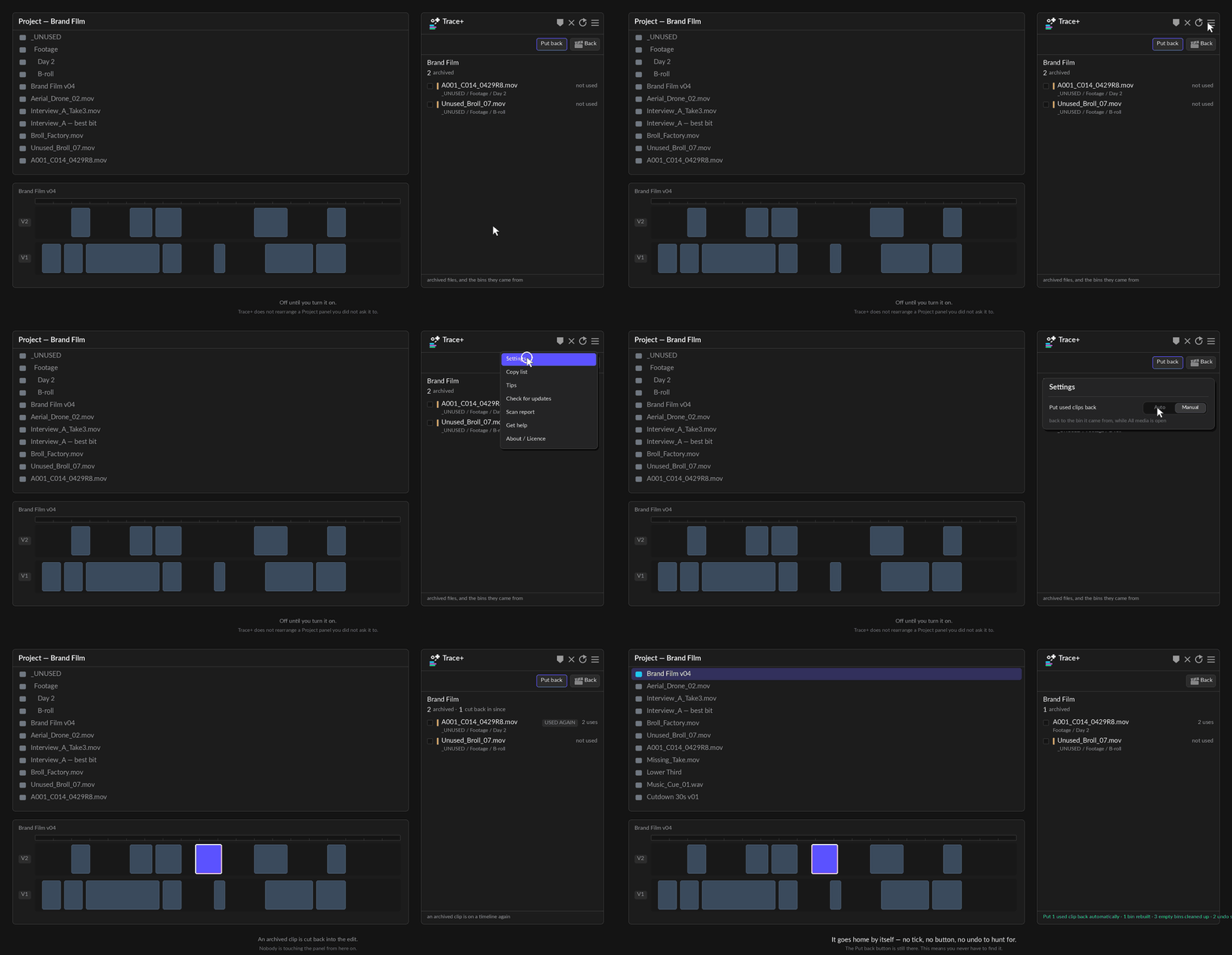
Cut an archived clip back in and it files itself home.
Back into the bin it came from — rebuilding that bin if it was deleted while the footage sat in the archive — and clearing away the empty bins it made on the way.
There's no database behind this. The trail is the bin path itself, so it still works next month, on another machine, after somebody has rearranged things by hand.
The ladder
Start free. Step up when the project does.
Trace+ is a strict superset — everything you learned in the free panel still works, in the same place, under the same name. Press the other one and watch what changes.
Project panel.
Trace scans a clip you picked. Trace+ scans the entire project, with nothing selected.
| Trace | Trace+ | |
|---|---|---|
| Every use of one clip, across every sequence | ✓ | ✓ |
| Select every instance at once | ✓ | ✓ |
| Answers about clips you select in the timeline | — | ✓ |
| Tells the same footage again from a different part of it | ✓ | ✓ |
| Follows nests, subclips and linked audio | ✓ | ✓ |
| Hides archived cuts | ✓ | ✓ |
| Markers over every use | ✓ | ✓ |
| Colour labels | ✓ | ✓ |
| Colour-codes the uses that are the same frames | ✓ | ✓ |
| What one sequence uses, ranked | — | ✓ |
| What the whole project no longer uses | — | ✓ |
| What that weighs, in gigabytes | — | ✓ |
| Move to any bin — existing or new — and put back | — | ✓ |
| Duplicate imports — find and remove the spares | — | ✓ |
| Offline media, flagged and filterable | — | ✓ |
| Empty bins | — | ✓ |
| Compare two cuts | — | ✓ |
| Which parts of a long take you used | — | ✓ |
| And which parts you never used | — | ✓ |
| Filter by video, audio, stills or offline | — | ✓ |
| Only the cut you have open | ✓ | ✓ |
| Hide rows you have already dealt with | — | ✓ |
| Export CSV | — | ✓ |
The difference
Trace scans one clip. Trace+ scans your entire project.
Clips you have to select
Trace+ reads every bin, every timeline and every nest with nothing selected at all. You do not have to know which clip to ask about.
Trace scans the one clip you clicked.Not file counts
Unused media measured in gigabytes, including the subclip whose master sits in a bin and the interview imported twice under two names.
Trace counts uses. It never weighs anything.Press to file it away
Everything unused into a _UNUSED bin in one action, and back out the day you need it. It refuses to touch anything on a timeline.
Trace selects clips. It never moves one.Good questions
Everything else
Is this safe to point at a project that's on air?
It never deletes and never touches a file on disk – the most destructive thing it does is move items into a bin, which one Cmd-Z undoes. It also refuses to archive anything that's on a timeline, rather than warning you and doing it anyway.
Why does it want full filesystem access?
To read how big your media files are – the gigabyte number under the unused list. It reads file sizes, never file contents, and it uploads nothing. The only things that leave your machine are the licence activation and a once-a-day check for a new version.
How is this different from Remove Unused?
Remove Unused looks at sequences. It doesn't know about a subclip whose master is in a bin, a clip that only lives inside a nest, or the same interview imported twice. And it can't tell you what any of it weighs.
Trace+ also doesn't remove anything – it files it into _UNUSED, and can put
it back.
What happens if I archive something and then need it?
Cut it back into a sequence and Trace+ notices. It returns the clip to the bin it came from – rebuilding that bin if it was deleted while the footage sat in the archive – and clears away the empty bins it made.
There's no database behind this. The trail is the bin path itself, so it still works next month, on another machine, after somebody has rearranged things by hand.
Two machines – how does that work?
One key, two seats, activated over the internet once. Moving to a third machine? Press Remove on one of the first two and the seat frees immediately. No email, no waiting.
Is there a licence for a team?
Yes – Trace+ Studio: one key, ten machines. Everyone in the edit suite activates the same key, and Remove frees a seat when someone leaves or changes computer. Choose Studio when you buy.
Need more than ten? Email me and I’ll set it up.
Do I need Trace as well?
No. Trace+ is a strict superset – everything the free panel does is in here, in the same place, under the same name. Keep both if you like; most people don't need to.
Is it a subscription?
No. £35 once, updates included.
Something looks wrong. What do I send you?
☰ > Scan report, then Copy. It prints exactly what the panel did – how many sequences it read, how long it took, what it measured and what it couldn't. One paste answers what otherwise takes four emails.
Not answered here? The Trace+ help & documentation guide walks through every view, button and setting.
▲ Premiere Pro 25.6+ · macOS & Windows
Get Trace+ in Premiere.
Every bin, every timeline, every nest – and how many GB’s.
Trace
- Every use of one clip
- Select all instances
- Nests, subclips, linked audio
- No account, no licence key
Trace+
- Everything in Trace
- The whole project, weighed
- Archive, and put-back – manual or automatic
- 2 machines, moved with one press
- Updates included. Not a subscription.
Buying for a team? Trace+ Studio50% off is one key for 10 machines. Get Studio ↓
For teams
Trace+ Studio50% off
One key, 10 machines – for an edit suite, an agency or a post house.
10 single licences £350Save £175
- Every editor activates the same key on their own machine
- Someone leaves or changes computer? Press Remove and the seat is free again
- Everything in Trace+, the same updates, one payment
Need more than 10? Email me and I’ll set it up.
Trace+ reads your entire project, not just an individual clip. See everything you’ve used and have left on the cutting floor in one click.
Your whole project in one click.
© NK Courses 2026 · Help & documentation · Terms · Trace, free